
Amazon seller math
Know the math
before the buy
ASINPeek puts a practical FBA and FBM profit calculator beside the Amazon listing, so a sourcing decision starts with the numbers that actually move margin.
FBA + FBMROI + marginMax buy cost
What you can see
Evidence that
fits the decision
- Model your inputs — Adjust selling price, cost of goods, coupon, and fulfillment path while you research.
- Account for listing coupons — Apply a coupon shown on the Amazon listing so the calculation reflects the price a customer can actually pay.
- See the outputs — Read Amazon fees, profit, ROI, margin, zero-profit price, and max buy cost in one panel.
- Compare the Buy Box — Use the current offer and seller context as part of the same buy-or-pass decision.
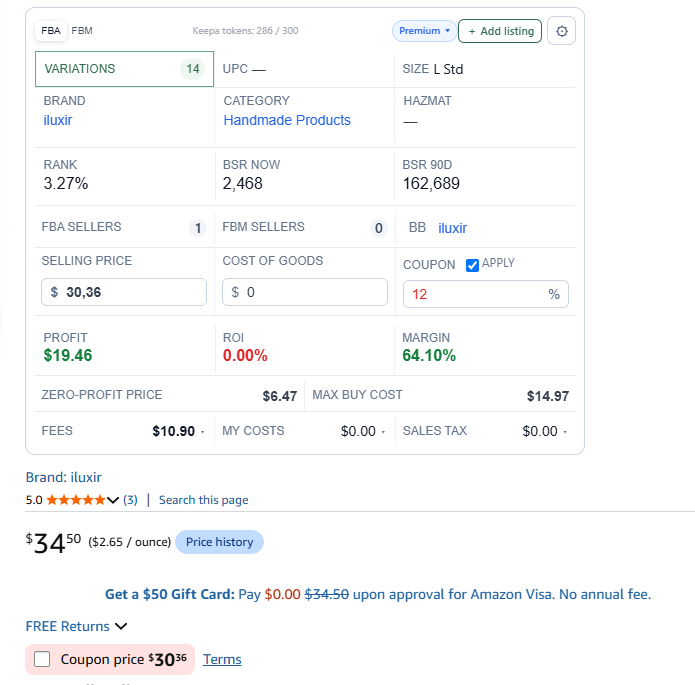
Structured output
Know exactly
what gets measured
| Signal | How ASINPeek uses it |
|---|---|
| Selling price | Start with the listing price or adjust it to test a realistic scenario. |
| Costs + coupon | Enter cost of goods and apply a listing coupon percentage when one is available. |
| Amazon fees | Keep the fee line visible instead of estimating it in a separate spreadsheet. |
| Profit, ROI, margin | Use the outputs to compare a product against your sourcing targets. |
| Break-even + max buy cost | Know the ceiling for your purchase price before you place an order. |