
Variation-level research
Scan available variations
Compare the proof
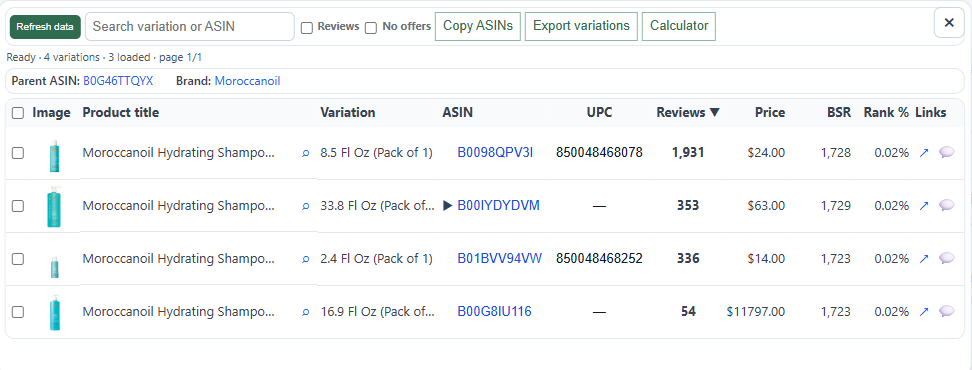
ASINPeek turns a crowded Amazon parent listing into a readable table of available child ASINs, variation names, prices, BSR, and reviews, then adds rating and product details to an Excel-ready CSV export.
Child ASINsReviews in scannerRatings in CSV export
What you can see
Evidence that
fits the decision
- Scan a parent ASIN — Load the listing once and keep the available child products in one research view.
- Compare review counts — See review counts by child ASIN so a strong parent-level total does not hide a weaker variation.
- Export the result — Move variations into an Excel-ready CSV instead of rebuilding the table by hand.
Structured output
Know exactly
what gets measured
| Signal | How ASINPeek uses it |
|---|---|
| Variation | Child product name or option, such as size, color, or bundle. |
| ASIN + link | The child ASIN and a direct Amazon product link for follow-up research. |
| Price + BSR | Current price, Best Sellers Rank, and rank percentage where available. |
| Reviews | Compare review counts directly in the scanner table. |
| Rating in export | Include each available child rating in the exported CSV for follow-up analysis. |
